


Sitemap and Web Architecture are often treated as separate SEO tasks: one file for search engines and one plan for navigation. That split causes problems. A sitemap can expose URLs, but it cannot make a confusing site easy to explore. Strong web architecture creates clear paths for users and crawlers, while a sitemap provides a controlled record of the pages you want discovered.

When these systems agree, teams can audit change, find weak areas, and manage large sites with less manual effort. When they conflict, the result is often duplicate URLs, orphan pages, wasted crawl activity, and unclear ownership of the website.
Table Of Contents
• Define Sitemap And Web Architecture
• Design A Crawlable Navigation System
• Audit Sitemap And Architecture Discrepancies
• Scale Sitemaps For Complex Websites
• FAQ
Define Sitemap And Web Architecture
The Short Answer
Web architecture is the connected structure of a website. It includes page hierarchy, information architecture, navigation menus, URL patterns, internal links, templates, and the relationships among content.
A sitemap is a representation of part of that structure. An XML sitemap is a machine readable list of URLs intended for search engine discovery. An HTML sitemap is a user facing navigation page that can help people reach sections of a site.
SEO.com's overview of website architecture defines the discipline as the way pages are organized and connected, while also distinguishing the user focused HTML sitemap from the crawler focused XML sitemap.
The practical distinction matters because discovery and importance are not the same thing. An XML sitemap can tell a crawler that a URL exists. It does not explain whether that page is central to a topic, easy for a visitor to reach, or supported by relevant internal links.
Think of web architecture as the building and the sitemap as an updated directory. A directory can list every room, but it cannot fix poor corridors, hidden entrances, or signs that send visitors in the wrong direction.
XML Sitemaps, HTML Sitemaps, And Internal Links
These components overlap, but each solves a different problem.
Component | Primary Audience | Main Function | What It Cannot Replace |
|---|---|---|---|
XML sitemap | Search engine crawlers | URL discovery and monitoring | Internal linking or clear hierarchy |
HTML sitemap | Website visitors | Supplemental navigation | Main menus and contextual links |
Internal links | Users and crawlers | Reachability, context, and path selection | Canonical URL control |
Canonical tag | Search engines | Preferred version of duplicate content | A usable site structure |
robots.txt | Crawlers | Crawl access control | Indexation decisions or sitemap quality |
SEO Sherpa's explanation of sitemap and robots.txt roles supports this separation: XML sitemaps aid discovery, HTML sitemaps serve users, and robots.txt participates in crawl control.
I recommend treating the XML sitemap as a published inventory of preferred indexable URLs, not as a catch all export from a content management system. That mindset changes the questions a team asks. Instead of asking, “Did we generate a sitemap?” ask, “Does this file represent the website we want search engines to understand?”
Why Architecture Affects More Than SEO
A clear navigation hierarchy reduces decision effort for visitors. A visitor looking for a service, product category, support article, or location should not need to guess which menu path is correct. The same structure gives crawlers a clearer route through the site.
Search Engine Journal's guidance on website architecture describes hierarchy, content grouping, and internal links as core architectural elements. That is useful because it moves the discussion beyond folder names alone.
For example, a business may publish separate pages for “commercial roofing,” “roof repair,” and “roof inspection.” If all three pages sit in an ungrouped blog feed, users may struggle to understand the service relationship. If they sit beneath a clear services hub with contextual links, the subject model is easier to follow.
The URL path can reinforce that structure, but it should not be the only signal. A clean URL such as /services/roof-repair/ helps people interpret location and purpose. The internal-link graph, headings, navigation labels, and canonical URL must support the same story.
Design A Crawlable Navigation System
Start With The Intended Content Model
Before creating sitemap files, define the site’s major content groups. Most websites need a small set of durable top level sections, then narrower subcategories beneath them. The exact number depends on the business and audience. There is no universal rule that every important page must be within a fixed number of clicks.
What matters is whether high value pages are reachable through logical routes without relying on search, obscure footer links, or direct URLs.
A useful planning sequence is:
Identify the major user intents, such as buying, comparing, learning, requesting support, or finding a location.
Group pages that answer the same intent or belong to the same topic.
Assign each group a hub page that explains the category and links to its most useful child pages.
Create contextual links between genuinely related pages.
Confirm that the XML sitemap includes only the preferred, crawlable, indexable versions of pages that should be discovered.
This approach avoids a common failure mode: adding thousands of pages to a sitemap before deciding whether those pages deserve a stable place in the information architecture.
Build Two Connected Systems
A practical site uses both a discovery architecture and a ranking architecture.
The discovery architecture includes XML sitemaps, internal links, feeds, and other paths that expose URLs to crawlers. Its purpose is to make important URLs findable.
The ranking architecture is the contextual system that indicates relationships and relative prominence. It includes hub pages, navigational placement, relevant anchor text, editorial links, structured categories, and the quality of the page itself.
A product page can be present in an XML sitemap yet remain structurally weak. Consider an ecommerce item that has no category link, no related product link, and no link from search results or editorial content. Search engines may discover it through the sitemap, but users have no natural route to it. That is an orphan page in practice, even if the sitemap lists it.
Choose HTML Sitemaps Selectively
An HTML sitemap is not automatically necessary for every site. On a small website with a clear main menu, well linked service pages, and a useful footer, it may add little value.
It can be worthwhile when a site has broad content coverage, unusual navigation constraints, accessibility needs, or a large archive that is difficult to browse through standard menus. It may also help expose a stable top level view of categories without forcing every destination into the primary navigation.
Avoid turning an HTML sitemap into a massive ungrouped list. A page containing thousands of bare links is rarely useful to visitors. Group destinations by audience need, topic, service, product family, or region. The page should function as navigation, not as a dumping ground.
Audit Sitemap And Architecture Discrepancies
Turn The Sitemap Into A Quality Dataset
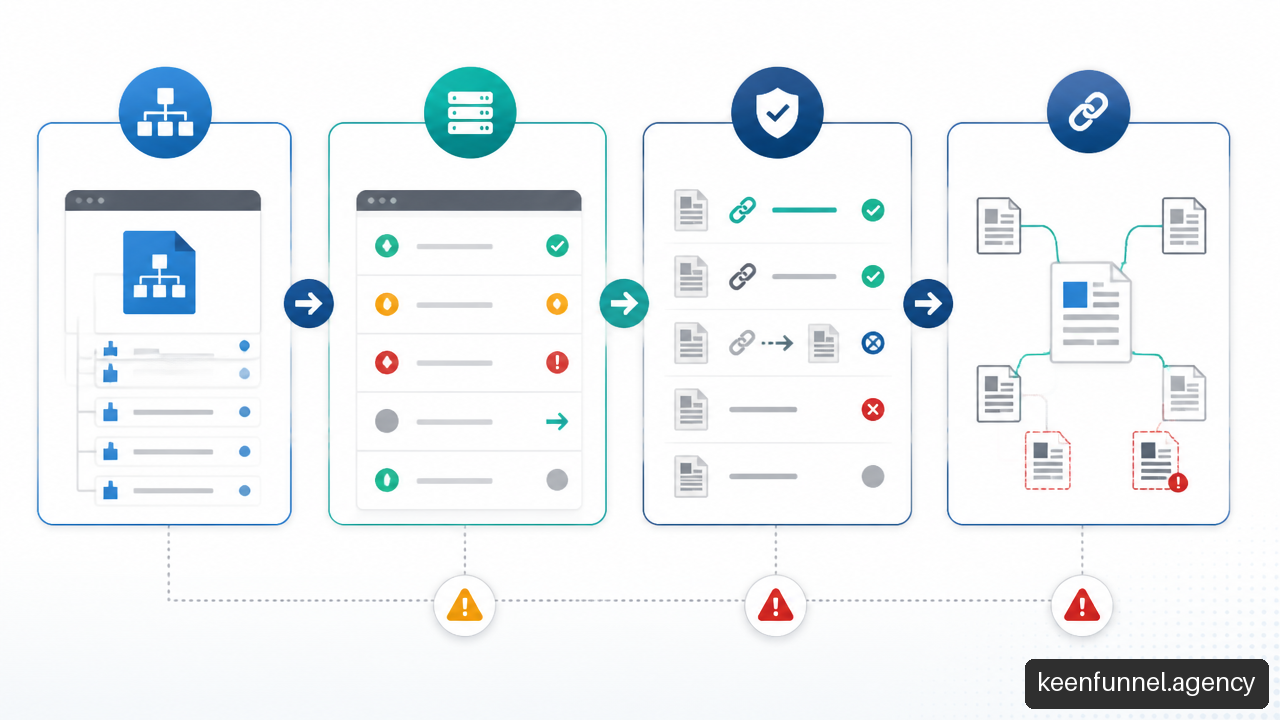
The most useful sitemap audit compares sitemap membership with the real behavior of each URL. This is more revealing than simply checking whether the XML file loads.
For every sitemap URL, collect a small set of fields:
Field | Question To Ask | Typical Problem Revealed |
|---|---|---|
HTTP status | Does the URL return a successful response? | Redirects, errors, or expired pages |
Canonical target | Is the URL self canonical or canonicalized elsewhere? | Duplicate URL inclusion |
Indexability | Can the page be indexed? | Noindex directives or blocked resources |
Internal links | Does the page receive meaningful internal links? | Orphan or weakly connected pages |
Click path | Can users reach it through logical navigation? | Hidden content or poor hierarchy |
Content segment | What template, locale, category, or status owns it? | Pattern based operational failures |
This is a working methodology rather than a universal industry standard, but it is a strong way to find contradictions across systems that are often audited separately.
For instance, suppose a sitemap includes 500 location pages. A crawl may reveal that 200 canonicalize to regional hub pages, 75 are set to noindex, and 100 receive no internal links. The problem is not “the sitemap is missing.” The problem is that the published URL inventory, canonical rules, and navigation model disagree.
Resolve Signal Conflicts In Order
Conflicting signals need investigation, not a blanket fix. The following order is usually sensible.
Check the page purpose. Decide whether the URL should exist as an independent destination.
Confirm the preferred canonical URL. If multiple URLs represent the same content, choose one preferred version.
Check indexability. A page intended for search visibility should not be accidentally marked noindex.
Review crawl access. Confirm robots.txt and other controls do not block resources needed to access the intended page.
Validate internal-link support. Important pages should have contextual and navigational paths where appropriate.
Update sitemap membership. Include the final canonical, successful, indexable URL, not the retired or duplicate alternative.
HubSpot's technical SEO audit guidance supports including canonical URLs that return successful responses and are eligible for indexing. It also notes the commonly used sitemap file limits of 50,000 URLs and 50 MB uncompressed.
Fair warning: robots.txt is not a substitute for removing an unwanted URL from a sitemap. If a URL is blocked from crawling but still presented in the sitemap, the signals are difficult to interpret. First decide whether the page should be accessible and indexable. Then align the controls.
Measure What Changes Over Time
Avoid measuring success only by whether a sitemap was submitted. Track operational indicators by segment, then compare changes after releases, redesigns, or content launches.
Useful indicators include:
• Sitemap URLs returning errors or redirects
• Sitemap URLs that canonicalize to another page
• Sitemap URLs with no meaningful internal links
• Indexable URLs excluded from the intended sitemap segment
• Pages with unexpected noindex directives
• Indexation patterns by template, category, locale, or publication month
There is no broadly validated universal threshold for a “good” orphan rate or an ideal depth level. A site with 20 pages and a marketplace with two million products have different constraints. The better question is whether the trend points to a clear ownership or template problem.
Scale Sitemaps For Complex Websites
Use Segmentation As An Operations Tool
Large sites should rarely rely on one undifferentiated sitemap file. A sitemap index can point to multiple sitemap files, making it easier to organize URLs by meaningful groups.
HubSpot's sitemap structure guidance supports sitemap indexes, absolute URLs, and organizing sitemap entries around canonical, indexable pages.
Segmentation can be based on:
• Content type, such as articles, products, locations, help documents, or videos
• Geography, such as language, country, or regional site sections
• Template family, such as category pages, product detail pages, and editorial pages
• Publication state, such as current pages, migrated pages, or newly launched sections
The benefit is diagnostic clarity. If product URLs show a sharp increase in redirects while editorial content remains stable, the issue is likely connected to a product feed, template, inventory rule, or deployment. A single all purpose sitemap makes that pattern harder to isolate.
Model Faceted Navigation Before Indexing It
Faceted navigation is useful for shoppers, but it can generate a huge number of URL combinations. A clothing site may let visitors filter by color, size, brand, material, price, and availability. Six filters can produce many variations, even when most pages offer little unique value.
Do not automatically place every filtered URL in the XML sitemap. First decide which filtered pages represent durable search destinations with a clear user purpose and sufficient differentiated content.
A reasonable decision model looks like this:
Filtered URL Type | Likely Sitemap Decision | Reason |
|---|---|---|
Curated category, such as women’s waterproof hiking boots | Consider inclusion | Clear intent and stable product group |
Temporary inventory filter, such as items available today | Usually exclude | Changes often and may create thin page sets |
Near duplicate sort order, such as price low to high | Exclude | Changes presentation, not core content intent |
High demand brand and category combination | Consider inclusion after review | May serve a distinct audience need |
The right choice depends on the catalog, search demand, content quality, and ability to maintain canonical rules. Where the evidence is unclear, start with a restrained indexation policy and monitor results rather than opening every filter combination to crawling.
Control Website Migrations With Inventories
A migration can break architecture even when redirects appear to work. The risk is highest when URLs, templates, language folders, or category structures change at the same time.
Before launch, create an inventory of the old canonical URLs, their intended destination URLs, redirect status, internal links, and sitemap segment. After launch, crawl both the new structure and the redirect map.
Use this sequence:
Freeze a pre launch URL inventory and mark each URL as keep, redirect, consolidate, or retire.
Map every retained topic to a new canonical destination.
Update navigational and contextual internal links to point directly to new URLs where possible.
Publish replacement sitemap files containing the new canonical, indexable URLs.
Monitor error patterns, unexpected canonical changes, and orphan pages after release.
Retire outdated sitemap files once the replacement structure is confirmed.
Temporary overlap may be necessary during a staged migration, but it should be planned. Leaving both old and new URL sets in active sitemaps without clear redirect and canonical logic can prolong confusion.
Key Takeaways
Treat Structure As A Coordinated System
• Use web architecture to create logical journeys. Organize pages around real user intents, not just publishing convenience.
• Use XML sitemaps as controlled inventories. Include canonical, successful, indexable URLs that the business intends search engines to discover.
• Do not use a sitemap to compensate for weak internal links. Important pages need meaningful routes from hubs, categories, and related content.
• Segment large sitemap programs. Group files by content type, locale, or template so failures can be traced to an operational source.
• Audit contradictions. Compare sitemap membership against status codes, canonical targets, indexability, and internal-link reachability.
• Be conservative with faceted URLs. Index only filter combinations that serve stable, distinct user needs.
• Treat migrations as architecture changes. Validate old URLs, redirects, new canonicals, links, and replacement sitemap files as one release process.
FAQ
What Is The Difference Between A Sitemap And Website Architecture?
A sitemap lists URLs, while website architecture defines how pages are organized and connected. Architecture includes hierarchy, navigation, internal linking, content groups, and URL relationships. A sitemap supports discovery, but it does not define the full user experience or page importance.
Is An XML Sitemap Part Of A Website’s Architecture?
Yes, but it is only one supporting component. XML sitemaps contribute to crawlability and URL discovery. They should reflect the intended architecture rather than replace navigation, contextual links, or category structure.
Should Every Page Appear In An XML Sitemap?
No. Include URLs that are canonical, successful, indexable, and intentionally available for search discovery. Exclude redirects, error pages, duplicate versions, noindex pages, and low value parameter combinations unless there is a specific reason to expose them.
What Is The Difference Between An XML Sitemap And An HTML Sitemap?
An XML sitemap is built for search engines. An HTML sitemap is a visible page built for visitors. An HTML sitemap can provide supplemental navigation, while an XML sitemap gives crawlers a structured URL list. Neither should replace the site’s main navigation or internal-link strategy.
Can A Sitemap Fix Poor Internal Linking?
No. A sitemap may help a crawler discover a page, but it does not create a useful route for visitors or communicate the page’s relationship to other content. Fix weak linking by improving hubs, category pages, breadcrumbs where appropriate, and contextual links.
Should Orphan Pages Be Included In A Sitemap?
It depends on whether the page is meant to be an independent search destination. If it is valuable, add meaningful internal links and include its canonical URL in the sitemap. If it has no user purpose or strategic value, consider consolidating, redirecting, or retiring it instead.
When Should A Site Use A Sitemap Index?
Use a sitemap index when the site requires multiple sitemap files due to URL volume, file limits, or operational segmentation. It is especially useful for ecommerce, multilingual, publishing, and enterprise websites that need separate reporting for different URL groups.
Can Submitting A Sitemap Guarantee Indexing?
No. Submission supports discovery, but indexing depends on many factors, including crawl access, canonicalization, content quality, duplication, and the search engine’s evaluation of the page. Treat sitemap submission as a starting point for monitoring, not proof of indexation.
Sources And References
• SEO.com — Website Architecture for SEO: How to Improve Your Site Structure: https://www.seo.com/basics/technical/website-architecture/
• SEO Sherpa — Website Architecture: How to Structure Your Site for SEO and UX: https://seosherpa.com/website-architecture/
• HubSpot — Understanding Technical SEO: Audit Fundamentals: https://blog.hubspot.com/marketing/technical-seo-guide
• HubSpot — Sitemap Structure: How to Strengthen Yours for SEO and AEO: https://blog.hubspot.com/website/sitemap-structure
• Search Engine Journal — How To Optimize Website Architecture For SEO: https://www.searchenginejournal.com/how-to-optimize-website-architecture-for-seo/477179/

